Thursday, January 4, 2018

How to Get Paid Without Spending a Dime [Free Invoice Template Generator]

As marketers, we think a lot about what it means to deliver a consistent, on-brand experience across all of our different channels.

We recognize the importance of this unification, as it helps to improve brand recognition, foster loyalty, and improve the overall customer experience.

Not to mention, it forces us to establish a formalized process for creating and executing on each piece of marketing collateral.

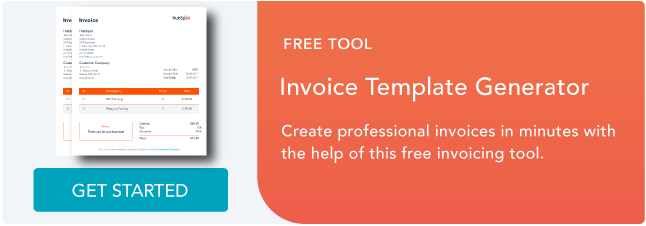
However, when it comes to invoicing, many of these strategic efforts tend to drop off. Suddenly, we cast aside branding, scramble for an existing document we can clone, and get to itemizing.Use the free HubSpot Invoice Template Generator to create professional invoices in minutes.The result? A pile of mismatched invoices and a disconnected plan for getting paid on time.

Now fighting disorganization, especially when it comes to your business finances, can be both time-consuming and frustrating. That's why we created Invoice Template Generator -- a free invoicing tool designed to save you time and resources in 2018.

Invoice Template Generator guides you through the invoice creation process by prompting you to fill out form fields within an actual interactive invoice template.

Once you complete all of the fields, you'll have an opportunity to download the invoice as a PDF that can be easily emailed to your customer.

Many aspects of the tool are fully customizable, allowing you to:

  • adapt the invoice based on whether or not you sell products or services
  • adjust the currency
  • add notes or payment terms
  • add your business logo
  • customize the color scheme

Ready to get started? Click here to begin creating a professional, on-brand invoice today.

Invoice Template

Invoice Template

How to Create a Case Study Video That Converts Leads [Video]

Wednesday, January 3, 2018

Yoast SEO: How to use the internal linking tool

The 6 Biggest Marketing Lessons HubSpot Learned in 2017

One of the big themes for me in 2017 was what it means for marketers to do the right thing. Outbound marketing that relies on spamming, irrelevant advertising, and other tactics that are almost as bad for the business as they are for the customer is obviously not the right thing. Better analytics has brought a lot of focus and measurability to marketing, but creates the tendency to do what’s best for the business versus what’s best for the customer.

And even well-intentioned inbound marketers who are trying to pull versus push ... well ... sometimes we just pull a little too hard.

It’s hard for goal-oriented, data-driven marketers to stop doing things that hit the numbers ... even if we know these tactics fail to create the best experience for our prospects or scorch the earth for future efforts.

One of our goals as a marketing team in 2017 was to push ourselves to do the right thing, even if that meant more difficulty for us or even missing our goals. It was a tough year and yes, we missed some numbers, but wow ... we also learned a ton, and I wanted to share some of our biggest lessons here. I think they have big implications for marketers in 2018.

1. We can break our email addiction and still hit our goals.

Marketers have been touting the death of email for years, and while I wouldn’t say the channel is dead, you’ll be hard pressed to find a marketer who will argue that engagement on email is what it was five years ago. At the start of 2017, HubSpot’s CMO asked our team to see if we could break our addiction to email.

Could we shift conversations to emerging platforms like Facebook Messenger, and cut our reliance on email? The answer was a resounding yes.

In 2017, our team cut email volume in North America by 50% while increasing engagement by 28%. That’s wild.

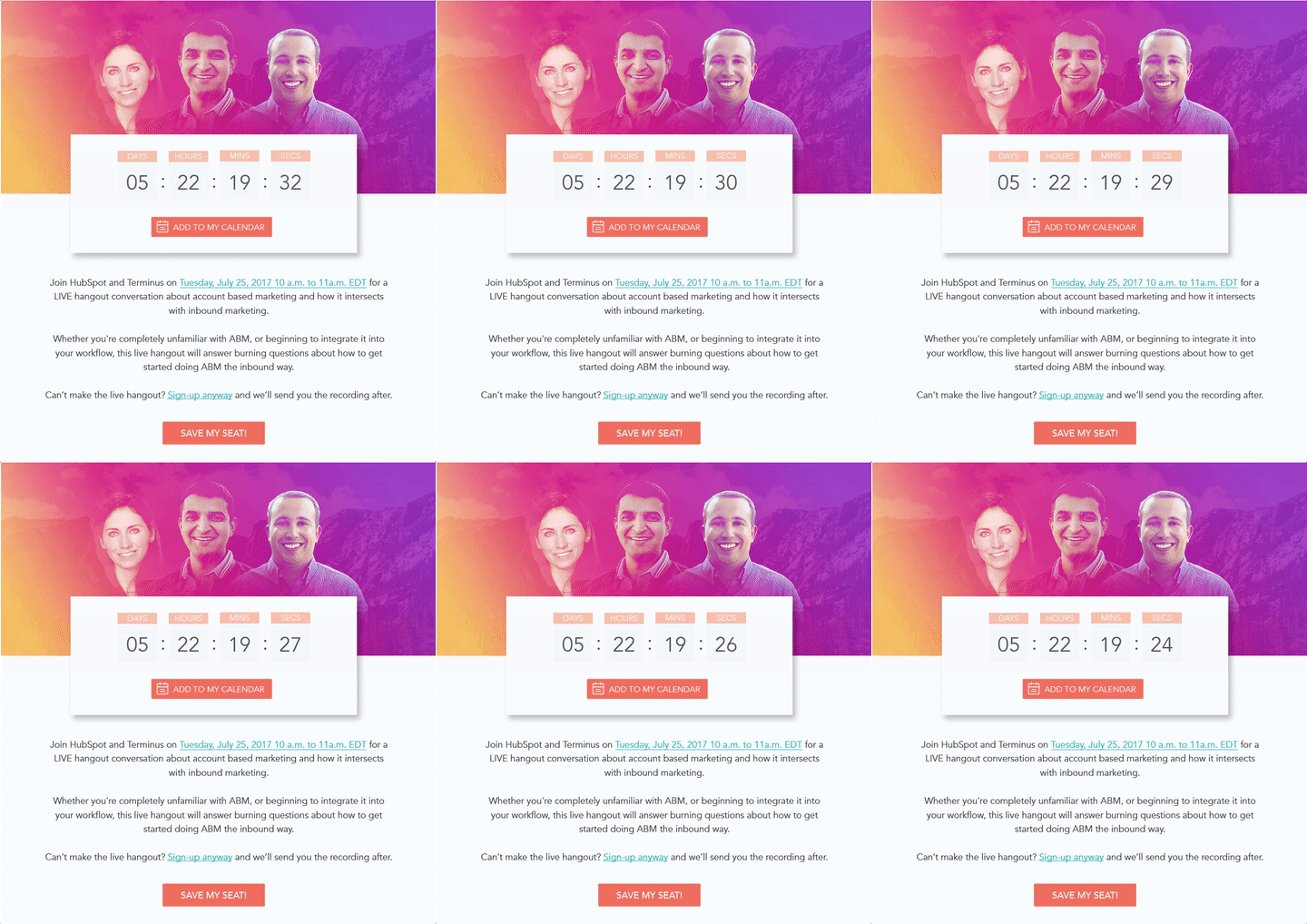
One tactic our team used to achieve this was moving from two weekly email sends per week to one and then focusing on making that one send count: better segmentation, lots of testing, and creating more interactive content (like the webinar promotion email that includes a countdown shown below).

abmcountdown.gif


2. Offsite messaging has earned its place in inbound marketing.

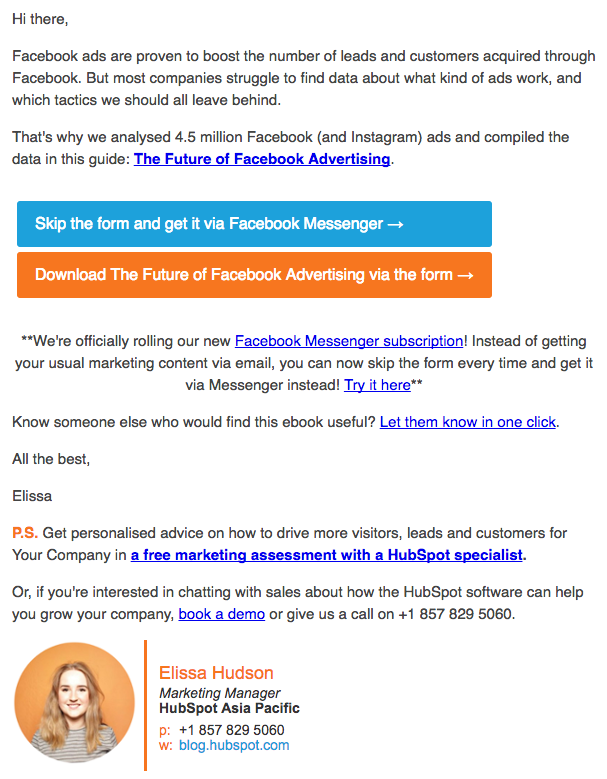
Another one of the reasons we have been successful at reducing our reliance on email is that we got serious about testing emerging channels. Here’s an offer email we sent earlier this year that gives people the option to access content via Facebook Messenger or a form:

Screen Shot 2017-06-29 at 2.12.51 PM.png

If people choose Facebook Messenger, our chatbot automatically delivers the requested content to them in their Messenger app instead of their inbox. We’ve seen offers delivered via Facebook Messenger result in 2.5x lifts in open rates and 6x lifts in click rates vs. email.

This improved performance is partially a function of the channel (it’s great to get push notifications on someone’s home screen), but partially a function of it being a channel that aligns with how people want to shop and buy today, and how they want to engage with companies.

3. Onsite messaging is now playing an integral role in inbound sales.

For the past decade, lead forms have been the go-to way for prospects to express interest in working with your company. But just because something has worked, doesn’t mean it will keep working.

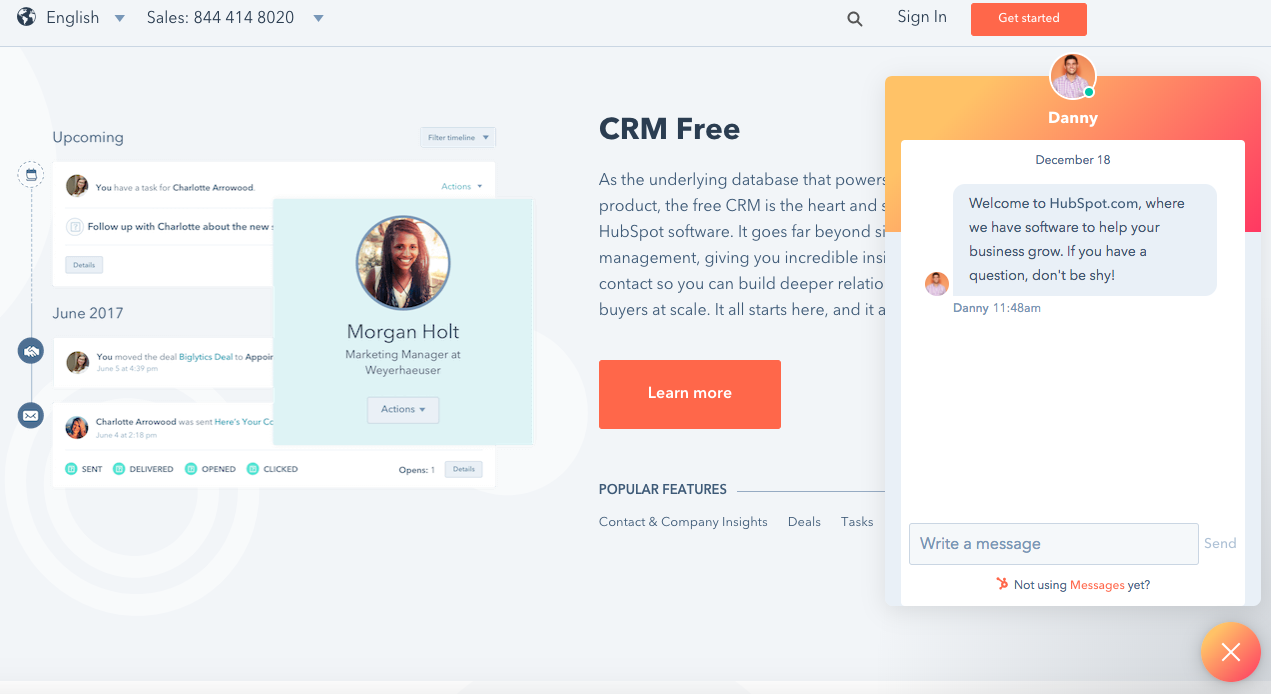
This year HubSpot’s marketing team got very serious about testing alternatives to lead forms. We rolled out onsite messaging across our entire website.

Yes, this meant hiring more salespeople to respond to the influx of one-to-one communications.

Yes, this meant responding to a lot of irrelevant inquiries with a personal, human response.

Yes, it was expensive and took some internal training and systems finagling.

But …

We’re producing 20% more qualified opportunities as a result of adding an onsite messaging option.

Customers today expect to get answers to their questions right.now. For serious buyers, a lead-form is just too long of a delay. And all of the short-term costs will decrease as we get more serious about chatbots. Onsite messaging is now an integral part of our inbound sales playbook and we’re looking to start even more conversations in 2018.

4. B2B podcasting doesn’t need to be boring.

Picasso is famously credited with saying, “Good artists borrow, great artists steal.”

But there’s a high probability he stole this aphorism from T.S. Elliot.

Regardless of credit, what’s true for artists is true for marketers: Copying is one of the fastest ways to get good at something really quickly.

The problem is that you very quickly end up in a world where every marketer is doing the same thing. So sometimes, doing the right thing as a marketer means intentionally separating from the herd.

We started The Growth Show back in 2013, and “boring” is probably an unfair descriptor. Actually the show has built an engaged core audience, but it never turned into the kind of massive audience builder that consumer podcasts can be. We gave ourselves a pass, it’s a B2B podcast, right?

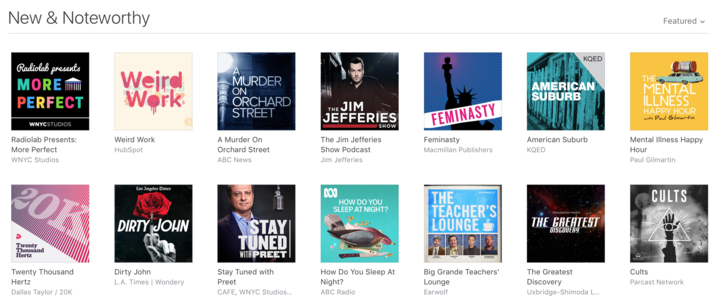
But in 2017, our growing podcast team pushed us to get a little weird, launching a podcast called Weird Work where we interview professional mermaids, ASMR content creators, and writers of dinosaur erotica. The reception to this little series has been so cool:

  • We made it on the top 100 podcasts list in iTunes
  • Achieved New & Noteworthy status in the iTunes store (this is the promised land for podcasters everywhere)
  • Were named a “Top 10 Podcast Right Now” by Inc.
pasted image 0.png

It’s tough to measure the business impact of such a “brand” play, but one way to think about content like this is in terms of ad spend. You can pay to advertise on someone else’s podcast or you can create your own audience and advertise there. We calculate that the value of the Weird Work audience is equivalent to $12,000 in ad spend every month.

Sometimes not following the herd pays off in a big way.

5. The future of SEO is topic clusters.

Google has been moving toward rewarding creators who create topic clusters for some time. This means that instead of Google looking at every individual post as its own SEO opportunity, it now looks at the scope of content being created by a given URL and sends more traffic to people who appear to be experts on a given topic.

We’ve been shifting to this strategy for new content creation for a while. But 2017 was the first year where we began to tackle 10+ years of legacy content, and re-working our architecture to fit the topic cluster model.

Why did it take us so long? Because this work is hard! We actually started a topic cluster project addressing the resource site architecture back in January of 2016 and it was so complicated we had to table it. In May of this year, we finally pushed it live and the results were astounding.

In the months following launch, traffic to our resource pages increased by 107%.

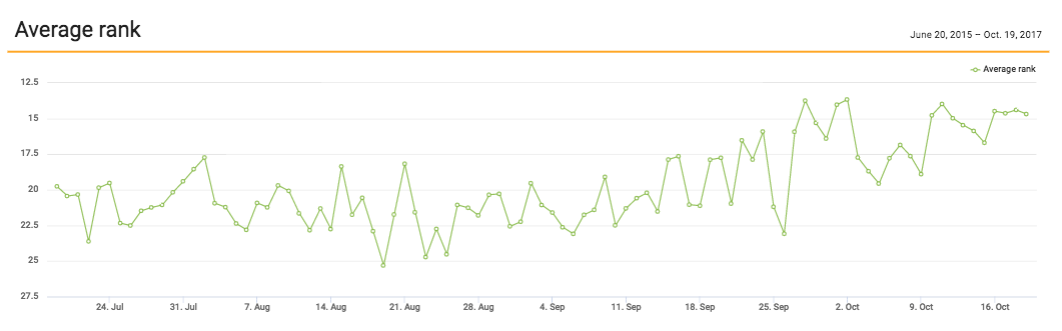
HubSpot’s blog team has also begun to rework older posts around select topic clusters. Here’s the impact of one of the first clusters we did; check out that average rank going up and to the right:

The days of throwing content at the wall to see what sticks are officially over. Doing the right thing today means creating content only when it meets a demonstrated user need. (BTW, HubSpot also released a tool earlier this year that makes it easier than ever to find and create your own Topic Clusters).

6. Doing fewer things better.

Every marketer has felt the pressure to churn out offer after offer and our team has not been exempt from that pressure. It’s hard to place bigger bets on a smaller number of activities.

Our co-marketing team feels this pressure every single week. In a given quarter, this team typically executes 15-20 campaigns. But we finally stopped and said, what if we could do less and take bigger swings? So we rolled the effort of four to five campaigns into one big campaign -- 4 Days of Facebook.

We went big with our partners (Facebook and Gary Vaynerchuck), we went big with our promotion (Facebook Messenger), and we went big across the company (getting buy-in from multiple marketing teams and regions to support the campaign).

The results? Our biggest acquisition campaign ever, in all of HubSpot’s history. It generated 10x the leads of a typical acquisition campaign and 6x the lifetime value of projected customers.

And it brought together so many things: new channels (Facebook Messenger), new ways of selling (acquiring users for HubSpot’s freemium funnel), live video, and amazing partnerships (Facebook!).

This was hands down my favorite campaign from the entire year and all because our co-marketing team committed to doing fewer things better.

Looking forward to 2018

I’m excited about these results. But most of all, I hope the results we’ve seen in 2017 encourage you to be a little bolder in your strategy, to push a little harder for the right things (even if you’re unsure about the results), and to occasionally miss some quantitative goals in order to learn some big things.

Good luck out there!

How to Optimize Your Google My Business Listing

Posted by sherrybonelli

An important first step in any local SEO strategy is to claim and verify your local business’ Google My Business (GMB) listing. Getting on Google My Business can increase your chances of showing up in Google’s Local Pack, Local Finder, Google Maps, and organic rankings in general. Qualifying local businesses can claim this free listing on Google and include basic information about their company, like their address, phone number, business hours and types of payments accepted.

If you haven’t claimed and verified your Google My Business Listing yet, that’s the first step. To get started, visit https://www.google.com/business.

Many local businesses just claim their GMB listing and forget about it. What most businesses don’t realize is that there are a variety of other features you can use to optimize your Google My Business listing and several reasons why you should frequently check your business listing to ensure that it’s accuracy stays intact. Want to know more?

Complete all the information Google asks for

There are a variety of questions you can answer to complete your Google My Business profile. When done, your listing will have valuable data that will make it easier for potential customers to find your company. And if you don’t fill that information in, someone else could. Many business owners don’t realize that anyone can suggest a change to your business listing — and that includes competitors.

When a searcher clicks on your GMB listing they can see a “Suggest an edit” option:

When someone clicks on that option they can literally edit your Google My Business listing (and make some pretty dramatic changes, too):

This is just one reason why it’s very important that you login to your Google My Business dashboard regularly to ensure that no one has attempted to make any unwanted changes to your listing. You'll see a notification that changes are pending if someone has made suggested changes that need your approval.

Also, it’s important to realize that Google encourages people who are familiar with your business to answer questions, so Google can learn more information about your company. To do this they can simply click on the “Know this place? Answer quick questions” link.

They’ll then be prompted to answer some questions about your business:

If they know the answer to the questions, they can answer. If not, they can decline.

Now, some business owners have cried foul, saying that competitors or others with malicious intent can wreak havoc on their Google My Business listings with this feature. However, Google’s philosophy is that this type of “user-generated content” helps to build a community, more fully completes a business’ profile, and allows Google to experiment with different search strategies.

After you get your Google My Business listing verified, continue to check your listing regularly to be on the safe side.

Google My Business Posts

Google Posts are “mini-ads” that show up in Google search in your Google My Business listing (in the Knowledge Panel and on Google Maps.)

You can have fun with your Posts by adding an image, a Call to Action (CTA), and even including a link to another page or website. If you’re using Yext, you can create GMB Posts directly from your Yext dashboard.

Here are just a few Post ideas:

  • If you’re having an event (like a webinar) you can set up an event Post with a date and time and then add a link to the registration page.
  • Do you have a sale going on during a specific time? Create a “sale” event Post.
  • Does your latest blog post rock? Add a short description of your blog post and link to the post on your blog.
  • New product you want to feature? Show a picture of this cool gadget and link to where people can make the purchase.
  • Want to spread holiday joy? Give potential customers a holiday message Post.

The possibilities with Posts are endless! Posts stay “live” for seven days or “go dark” after the date of the event. Google is great about sending you reminders when it’s time to create a new Post.

TIP: To grab a searcher’s attention, you want to include an image in your Post, but on Google Maps the Post image can get cut off. You might have to test a few Post image sizes to make sure it’s sized appropriately for Maps and the Knowledge Panel on desktop and mobile devices.

To get started with Posts, login to your GMB dashboard and you’ll see the Posts option on the left-hand side:

Do Google My Business Posts help with search rankings? Joy Hawkins and Steady Demand tested whether Posts had an impact on rankings, and they found that making Google My Business Postsmaking Google My Business Posts can improve rankingsimprove rankings.

Booking button feature

Google’s new Booking button feature can really help your business stand out from the crowd. If you have any type of business that relies on customers making appointments and you’re using integrated scheduling software, people can now book an appointment with your business directly from your Google My Business listing. This can make it even easier to get new customers!

If you have an account with one of Google’s supported scheduling providers, the booking button is automatically added to your Google My Business listing.

Messaging

Did you know that you can allow potential customers to send you text messages? This is a great way to connect directly with potential customers.

If you don’t want text messages sent to your personal phone number, you can download Google’s Allo app. When you set up your Allo account, use the same phone number connected to your Google My Business account. Now when someone messages you, Allo will send you a notification instead of the message appearing in your personal text messages.

To get started with Messaging, login to your GMB dashboard and click on “Messaging”:

This feature is still in its infancy, though. Right now, messaging is only available to mobile web users and is not available to mobile app or desktop users. People also won’t see the Messaging option in the Knowledge Panel or on Google Maps.

The ONLY way someone can message your business is if they perform a mobile web search on Chrome. (I expect that Google will expand the Messaging feature once they work the kinks out.)

Questions & Answers

Questions & Answers is a relatively new feature to Google local search. It’s very cool! Just like it sounds, Q&A allows people to ask questions about your business and you can answer those questions.

Here are a few things to keep in mind about Questions & Answers:

  • The Q&A feature is not visible on the mobile GMB app.
  • You need to login to the GMB dashboard to see if you have any new questions that need answering.
  • You cannot monitor the Questions on a mobile device unless you have an Android phone.
  • You can use the Google Maps App on Android devices to manage the Q&A feature as the business. To do this, download the Google Maps app, sign in with the email address you use for your GMB listing, and you will get push notifications if someone asks your business a question.

TIP: It’s important to note that just like “Suggest an Edit” on GMB, anyone can answer questions asked of your business. Therefore, you want to keep an eye out and make sure you answer questions quickly and ensure that if someone else answers a question, that the answer is accurate. If you find that someone is abusing your GMB listing’s Q&A feature, reach out to the Google My Business support forums.

Google My Business online reviews

Unlike Yelp, which vehemently discourages business owners to ask their customers for reviews, Google encourages business owners to ethically ask their customers or clients for online reviews. Online reviews appear next to your listing in Google Maps and your business’ Knowledge Panel in search. Reviews can help your business stand out among a sea of search results.

Additionally, online reviews are known to impact search result rankings, consumer trust, and click-through rates. According to BrightLocal’s 2017 Consumer Review Survey:

  • 97% of consumers read online reviews for local businesses in 2017, with 12% looking for a local business online every day
  • 85% of consumers trust online reviews as much as personal recommendations
  • Positive reviews make 73% of consumers trust a local business more
  • 49% of consumers need at least a four-star rating before they choose to use a business
  • Responding to reviews is more important than ever, with 30% naming this as key when judging local businesses
  • 68% of consumers left a local business review when asked — with 74% having been asked for their feedback
  • 79% of consumers have read a fake review in the last year

If you follow Google’s guidelines for Google My Business reviews, you can ask your customers for reviews. (However, if you violate any of these policies, your reviews could be removed.)

When customers leave reviews for you — good or bad — make sure you respond to them. Not only does it show that customer that you appreciate their feedback, it also shows potential customers that you care.

What happens if you get a negative review? First, don’t freak out. Everybody has a bad day and most people recognize that. Also, if you have a troll that gave you a one-star review and left a nasty comment, most people with common sense recognize that review for what it is. It’s generally not worth stressing over.

To learn more about strategically getting more online reviews, check out this article from Moz.


Get more out of your GMB listing

Hopefully these features have given you a new reason to login to your Google My Business account and get busy! If you have any other questions about optimizing your GMB listing, let me know in the comments.


Sign up for The Moz Top 10, a semimonthly mailer updating you on the top ten hottest pieces of SEO news, tips, and rad links uncovered by the Moz team. Think of it as your exclusive digest of stuff you don't have time to hunt down but want to read!

Tuesday, January 2, 2018

What Is Lagom, and How Can It Create a More Balanced Approach to Work and Life?

When the Global Innovation Index 2017 was released, Switzerland and Sweden led the pack -- as they have in previous years.

What makes this part of the world such a beacon of creative thought?

As someone who was fortunate enough to live and work in Sweden, I’ve come to believe the answer might be hiding in a single word: “lagom.”

Like many other non-English concepts, lagom defies quick or simple translation. It’s more of a cultural belief than mere letters strung together to signify objects or actions.

But what is it, and how can we use it at work and in life?

Finding lagom takes some practice, especially for those who were not brought up in Nordic countries where lagom is as natural as fjords and icy winters. And yet, it might be the key for businesspeople who are mired in a losing, imbalanced approach of creating products and then searching in vain for users -- not to mention, those who simply want to find better work-life balance.

The Barrier of Black-and-White Thinking

A barrier to embracing a lagom mindset is the prevalence of binary thinking. Left or right. Yes or no. Certainly, there are times in life when such starkness makes sense; no one would argue, for example, that at a train crossing, you would sit partway on the tracks instead of either stopping or going.

But in the business world, effective solutions and answers are rarely black-and-white. Unfortunately, many struggle to see shades of gray when it comes to product development or product-market fit. 

That sheds some light on why throwing convention out the window sometimes leads to success.

“Why can’t I connect travelers with local hosts for a whole new travel experience?”

“Why can’t I combine riders with independent drivers via an app for better taxi experiences?”

“Why can’t I create a taco shell made with Doritos?”

Lagom at Work

Despite some trends toward blended products -- lagom in a product context -- it isn't easy to see how to incorporate this concept of varied perspectives into your business. I struggled to see it myself, in fact, until I attended an international hackathon in Ireland.

Our team was comprised of eight engineers and two marketers, including myself. The challenge: Come up with a new kind of conference identification badge that people would love.

After brainstorming, we dismissed the notion of a traditional paper name tag encased in plastic, instead opting for an electronic one with image and video capabilities. 

Those who have read Arthur C. Clarke’s 3001: The Final Odyssey might be vaguely reminded of the nanochip inserted into everyone at birth to allow for more seamless introductions. Our suggestion, I'm proud to say, was less invasive -- but just as compelling.

We hoped that the badge would spur serendipitous moments for conference-goers via an embedded tracking mechanism. Our goal was to make it the centerpiece of a novel, productive conference experience. On that, everyone agreed -- but soon, the classic engineer-marketer battle ensued. 

Sometimes, engineers tend to be product-centric and marketers, well, market-centric. In our scenario, the former focused on the ability to solve our problem using the product, while the latter concentrated on the user experience and costs.

It wasn't until we reached a blended, balanced approach -- lagom -- that we managed to create the final product that both sides had hoped for.

A great product only sells if it satisfies a market that's willing to pay for the solution. Any product lacking balance is destined for a bumpy and potentially fatal debut. 

Product-Market Fit Through Balance

Nathan Furr and Paul Ahlstrom, co-authors of Nail It then Scale It, hit the proverbial nail on the head when they rhetorically asked:

With this question, Furr and Ahlstrom referred to a phenomenon that I’ve seen in over two decades of working with entrepreneurs and corporations: Achieving early product-market fit exponentially increases a startup's chances for success. Getting there, however, requires finding lagom. 

Let’s face it: You’ll get feedback on any solution ... eventually. But entrepreneurs are often blinded by a passion for a specific solution. Instead of listening to unadulterated feedback, they might peddle products in search of an audience. Watch one episode of “Shark Tank,” and you’ll immediately see why that's a disastrous approach.

A key milestone for me, which was essentially my “aha!” moment, was the realization that striving for product-market balance required exceptional listening ability. The only way to see a situation, or a product, from more than one viewpoint is to listen and accept others’ ideas -- then, challenge and question everything they've said with curiosity and sincerity.

Balance.

The only way to do that — the only way to balance your company vision with the needs of your market — is through repeated, meaningful customer conversations. 

Always Focus on the Customer

Customers naturally focus on their needs. As an entrepreneur, I realized that instead of guessing at those needs, I could learn what they are through conversations with my audience. Only by actively seeking market insights could I craft my business strategy, make better product decisions, and promote customer loyalty.

This epiphany has become the basis of everything I do and teach. By shifting from the “what” to the “why,” I’ve become aware of just how much of our decision-making depends on the internalization of others' ideas.

Most of us would like to believe that we make decisions consciously and individually. But back in the early 2000s, Harvard professors determined that 95% of purchase decisions are made subconsciously, posing quite the challenge to marketers.

That's why better business decision-making requires us to unearth our customers’ innermost thoughts and feelings. Yes, it takes practice just like any skill. Those of us who didn’t grow up in Nordic countries may find the pursuit of lagom -- by way of talking to customers, and perhaps even strangers -- challenging at first.

But doing so springs us from the trap of self-centeredness and facilitates raw, human-to-human connection. That's where lagom -- and true balance -- really begins.

How Does Mobile-First Indexing Work, and How Does It Impact SEO?

Posted by bridget.randolph

We’ve been hearing a lot about mobile-first indexing lately, as the latest development in Google’s ever-continuing efforts to make the web more mobile-friendly and reflect user behavior trends.

But there’s also a lot of confusion around what this means for the average business owner. Do you have to change anything? Everything? If your site is mobile-friendly, will that be good enough?

IS THIS GOING TO BE ANOTHER MOBILEGEDDON?!!

In this post I’ll go over the basics of what “mobile-first indexing” means, and what you may need to do about it. I’ll also answer some frequently asked questions about mobile-first indexing and what it means for our SEO efforts.

What is “mobile-first indexing”?

Mobile-first indexing is exactly what it sounds like. It just means that the mobile version of your website becomes the starting point for what Google includes in their index, and the baseline for how they determine rankings. If you monitor crawlbot traffic to your site, you may see an increase in traffic from Smartphone Googlebot, and the cached versions of pages will usually be the mobile version of the page.

It’s called “mobile-first” because it’s not a mobile-only index: for instance, if a site doesn’t have a mobile-friendly version, the desktop site can still be included in the index. But the lack of a mobile-friendly experience could impact negatively on the rankings of that site, and a site with a better mobile experience would potentially receive a rankings boost even for searchers on a desktop.

You may also want to think of the phrase “mobile-first” as a reference to the fact that the mobile version will be considered the primary version of your website. So if your mobile and desktop versions are equivalent — for instance if you’ve optimized your content for mobile, and/or if you use responsive design — this change should (in theory) not have any significant impact in terms of your site’s performance in search results.

However it does represent a fundamental reversal in the way Google is thinking about your website content and how to prioritize crawling and indexation. Remember that up until now the desktop site was considered the primary version (similar to a canonical URL) and the mobile site was treated as an “alternate” version for a particular use case. This is why Google encouraged webmasters with a separate mobile site (m.domain.com) to implement switchboard tags (which indicated the existence of a mobile URL version with a special rel=alternate tag). Google might not even make the effort to crawl and cache the mobile versions of all of these pages, as they could simply display that mobile URL to mobile searchers.

This view of the desktop version as the primary one often meant in practice that the desktop site would be prioritized by SEOs and marketing teams and was treated as the most comprehensive version of a website, with full content, structured data markup, hreflang (international tags), the majority of backlinks, etc.; while the mobile version might have lighter content, and/or not include the same level of markup and structure, and almost certainly would not receive the bulk of backlinks and external attention.

What should I do about mobile-first indexing?

The first thing to know is that there’s no need to panic. So far this change is only in the very earliest stages of testing, and is being rolled out very gradually only to websites which Google considers to be “ready” enough for this change to have a minimal impact.

According to Google’s own latest guidance on the topic, if your website is responsive or otherwise identical in its desktop and mobile versions, you may not have to do anything differently (assuming you’re happy with your current rankings!).

That said, even with a totally responsive site, you’ll want to ensure that mobile page speed and load time are prioritized and that images and other (potentially) dynamic elements are optimized correctly for the mobile experience. Note that with mobile-first indexing, content which is collapsed or hidden in tabs, etc. due to space limitations will not be treated differently than visible content (as it may have been previously), since this type of screen real estate management is actually a mobile best practice.

If you have a separate mobile site, you’ll want to check the following:

  • Content: make sure your mobile version has all the high-quality, valuable content that exists on your desktop site. This could include text, videos and images. Make sure the formats used on the mobile version are crawlable and indexable (including alt-attributes for images).
  • Structured data: you should include the same structured data markup on both the mobile and desktop versions of the site. URLs shown within structured data on mobile pages should be the mobile version of the URL. Avoid adding unnecessary structured data if it isn’t relevant to the specific content of a page.
  • Metadata: ensure that titles and meta descriptions are equivalent on both versions of all pages.
    • Note that the official guidance says “equivalent” rather than “identical” - you may still want to optimize your mobile titles for shorter character counts, but make sure the same information and relevant keywords are included.
  • Hreflang: if you use rel=hreflang for internationalization, your mobile URLs' hreflang annotations should point to the mobile version of your country or language variants, and desktop URLs should point to the desktop versions.
  • Social metadata: OpenGraph tags, Twitter cards and other social metadata should be included on the mobile version as well as the desktop version.
  • XML and media sitemaps: ensure that any links to sitemaps are accessible from the mobile version of the site. This also applies to robots directives (robots.txt and on-page meta-robots tags) and potentially even trust signals, like links to your privacy policy page.
  • Search Console verification: if you have only verified your desktop site in Google Search Console, make sure you also add and verify the mobile version.
  • App indexation: if you have app indexation set up for your desktop site, you may want to ensure that you have verified the mobile version of the site in relation to app association files, etc.
  • Server capacity: Make sure that your host servers can handle increased crawl rate.
    • (This only applies for sites with their mobile version on a separate host, such as m.domain.com.)
  • Switchboard tags: if you currently have mobile switchboard tags implemented, you do not need to change this implementation. These should remain as they are.

Common questions about mobile-first indexing

Is mobile-first indexing adding mobile pages to a separate mobile index?

With mobile-first indexing, there is only one index (the same one Google uses now). The change to mobile-first indexing does not generate a new “mobile-first” index, nor is it creating a separate “mobile index” with a “desktop index” remaining active. Instead, it simply changes how content is added to the existing index.

Is the mobile-first index live and affecting my site now? If not, when does it go live?

Google has been experimenting with this approach to indexing on a small number of sites, which were selected based on perceived “readiness”. A wider rollout is likely going to take a long time and in June 2017, Gary Illyes stated that it will probably take a few years before “we reach an index that is only mobile-first.”

Google has also stated the following on the Webmasters Blog, in a blog post dated Dec 18 2017:

“We will be evaluating sites independently on their readiness for mobile-first indexing based on the above criteria and transitioning them when ready. This process has already started for a handful of sites and is closely being monitored by the search team.

“We continue to be cautious with rolling out mobile-first indexing. We believe taking this slowly will help webmasters get their sites ready for mobile users, and because of that, we currently don't have a timeline for when it's going to be completed.”

Will Google only use my mobile site to determine my rankings?

Mobile-first means that the mobile version will be considered the primary version when it comes to how rankings are determined. However, there may be circumstances where the desktop version could be taken into consideration (for instance, if you don’t have a mobile version of a page).

That being said, you will potentially still see varying ranking results between mobile search results and desktop search results, so you’ll still want to track both. (In the same way that now, Google primarily uses the desktop site to determine rankings but you still want to track mobile rankings as these vary from desktop rankings based on user behavior and other factors).

When might Google use the desktop site to determine rankings vs. the mobile site?

The primary use case I’ve seen referred to so far is that they will use the desktop site to determine rankings when there is no mobile version.

It is possible that for websites where the desktop version has additional ranking information (such as backlinks), that information could also be taken into consideration - but there is no guarantee that they will crawl or index the desktop version once they’ve seen the mobile version, and I haven’t seen any official statements that this would be the case.

Therefore one of the official recommendations is that once the mobile-first indexing rollout happens, if you’re in the process of building your mobile site or have a “placeholder” type mobile version currently live it would actually be better to have no mobile site than a broken or incomplete one. In this case, you should wait to launch your mobile site until it is fully ready.

What if I don’t have a mobile version of my site?

If you don’t have a mobile version of your site and your desktop version is not mobile-friendly, your content can still be indexed; however you may not rank as well in comparison to mobile-friendly websites. This may even negatively impact your overall rankings on desktop search as well as mobile search results because it will be perceived as having a poorer user experience than other sites (since the crawler will be a “mobile” crawler).

What could happen to sites with a large desktop site and a small mobile site? Will content on your desktop site that does not appear on the mobile version be indexed and appear for desktop searches?

The end goal for this rollout is that the index will be based predominantly on crawling mobile content. If you have a heavily indexed desktop version, they’re not going to suddenly purge your desktop content from the existing index and start fresh with just your thin mobile site indexed; but the more you can ensure that your mobile version contains all relevant and valuable content, the more likely it is to continue to rank well, particularly as they cut back on crawling desktop versions of websites.

How does this change ranking factors and strategy going forward?

This may impact a variety of ranking factors and strategy in the future; Cindy Krum at Mobile Moxie has written two excellent articles on what could be coming in the future around this topic.

Cindy talks about the idea that mobile-first indexing may be “an indication that Google is becoming less dependent on traditional links and HTML URLS for ranking.” It seems that Google is moving away from needing to rely so much on a “URL” system of organizing content, in favor of a more API type approach based on “entities” (thanks, structured data!) rather than URL style links. Check out Cindy’s posts for more explanation of how this could impact the future of search and SEO.

Is there a difference between how responsive sites and separate mobile sites will be treated?

Yes and no. The main difference will be in terms of how much work you have to do to get ready for this change.

If you have a fully responsive site, you should already have everything present on your mobile version that is currently part of the desktop version, and your main challenge will simply be to ensure that the mobile experience is well optimized from a user perspective (e.g. page speed, load time, navigation, etc).

With a separate mobile site, you’ll need to make sure that your mobile version contains everything that your desktop site does, which could be a lot of work depending on your mobile strategy so far.

Will this change how I should serve ads/content/etc. on my mobile site?

If your current approach to ads is creating a slow or otherwise poor user experience you will certainly need to address that.

If you currently opt to hide some of your mobile site content in accordions or tabs to save space, this is actually not an issue as this content will be treated in the same way as if it was loaded fully visible (as long as the content is still crawlable/accessible).

Does this change how I use rel=canonical/switchboard tags?

No. For now, Google has stated that if you have already implemented switchboard tags, you should leave them as they are.


Has this overview helped you to feel more prepared for the shift to mobile-first indexing? Are there any questions you still have?

I’d love to hear what you’re thinking about in the comments!


Sign up for The Moz Top 10, a semimonthly mailer updating you on the top ten hottest pieces of SEO news, tips, and rad links uncovered by the Moz team. Think of it as your exclusive digest of stuff you don't have time to hunt down but want to read!