Wednesday, December 20, 2017

Followerwonk Is Moving On to a New, Loving Home

Posted by adamf

We have exciting news to share with you about our Twitter analytics tool, Followerwonk! For a while now we’ve been looking for a new home for the tool. We’re very pleased to announce that Marc Mims, one of the tool's original developers, formed a company to acquire it and will continue to operate the popular service under the Followerwonk brand.

A little history

In August 2016, we announced our intention to sell Followerwonk. It’s a useful and powerful application, but since acquiring it in 2012, we discovered that the overlap between users of Followerwonk and users of our core SEO products was smaller than we anticipated. To address that problem, in 2015 we offered it as a separate subscription — part of a larger strategy to extend our services beyond SEO. Last year we made some hard choices, ultimately deciding to refocus our efforts on our SEO core. It was then that we decided to seek a better home for our Twitter analytics tool.

Marc and Followerwonk go way back. As an engineer on the team that originally built and launched the tool, he came on board at Moz in 2012 when Moz first acquired it. He spent his first year on the Moz engineering team working on Followerwonk, and then a year working on Open Site Explorer, after which he returned to Followerwonk to help us relaunch it as a standalone product. In August 2016 we put Followerwonk in a holding pattern while we sought a buyer; during this time, Marc stayed on as a contractor to keep it healthy and operational for existing customers.

When Marc made an offer to acquire the product, it was like everything had come full circle; we were delighted to know Followerwonk will continue in good hands. There are only a few buyers in the world who could bring Marc's knowledge and passion for Followerwonk to the table.

In the months since August 2016, Marc spent his time making improvements and optimizations to the backend. He has quietly deployed 52 releases of Followerwonk in that time, improving performance and stability. He’s excited to be able to start adding new features now, too.

What does this mean for existing customers?

It means you can expect continued service from the product you love and the addition of new features and capabilities in the future. Moz will continue to host Followerwonk during a transition period while Marc prepares it to run on its own infrastructure. During that time, you can continue to use Followerwonk as you always have.

As Marc and Moz work together to transfer the service, Followerwonk customers should not notice much change; most of the work will be happening behind the scenes. Accounts will be transferred securely, and we will communicate directly with customers if any actions are required.

If you have legacy access to Followerwonk as part of your Moz Pro subscription from before its 2015 relaunch as a separate service, you will continue to have uninterrupted access to the tool through the transition period. Near the end of that period, Marc and Moz will jointly make a special offer allowing you to subscribe to Followerwonk and continue using it after the tool has left Moz’s infrastructure.

The transition period should take between three and six months. During that time, you can access the tool through your Moz login at https://moz.com/followerwonk. Afterwards, you’ll find it at https://followerwonk.com.

We’ll be sure to reach out to all customers and those with legacy access to provide more details well before any changes occur.

Final thoughts

In our hearts and minds, this is absolutely the best possible outcome for Followerwonk. It continues in the hands of a strong engineer, a beloved and respected member of the Moz team, an incredibly TAGFEE person, and someone who knows Followerwonk inside and out. Please join us in wishing Marc great success as he builds a team and a business around Followerwonk, giving it the love and attention it richly deserves.


Sign up for The Moz Top 10, a semimonthly mailer updating you on the top ten hottest pieces of SEO news, tips, and rad links uncovered by the Moz team. Think of it as your exclusive digest of stuff you don't have time to hunt down but want to read!

Google’s snippets and the length of your meta description

Yoast SEO 6.0: More characters for your meta descriptions

10 Examples of Effective Re-Engagement Emails

A whopping number of emails hit your subscribers’ inboxes each day. With so much competition for attention, it’s inevitable that a percentage of your subscriber list will lose interest in and stop engaging with your email marketing campaigns. It may not seem like a huge deal, but as a great percentage of your list stops engaging, the greater the risk you run of damaging your sender reputation and your email deliverability rates.

So, how can you address this issue? By creating special re-engagement emails targeted directly at your “inactive” subscribers.

Re-engagement emails play a vital role in the email lifecycle

Marketing Sherpa reports that, on average, marketers lose 25% of their email list each year (simply to attrition). Therefore, list retention should be an absolute must for all email marketers.

When done well, re-engagement emails can reduce list churn rates and boost incremental engagement. In terms of deliverability, re-engaging your inactive subscribers can enhance or at least help you maintain inbox placement rates for your emails. Often, if your overall engagement levels drop significantly, ISPs are more likely to consider you a low-quality sender, block, and make your engagement problems even worse.

So what does an effective re-engagement email look like? Here are 10 examples to inspire your next campaign effort.

10 Re-engagement Email Examples to Woo the Inactive Subscribers

1. Lowe’s

This re-engagement email draws attention to the improvements in their products since the last subscriber engagement. They have tactfully highlighted how more than 5 million members are using their services. Social sharing buttons are clearly visible in the email footer -- hoping to push more engagement in other channels as well.

C:\Users\Disha Bhatt\Pictures\Reengage\improvements-lowe's.jpg

2. Animoto

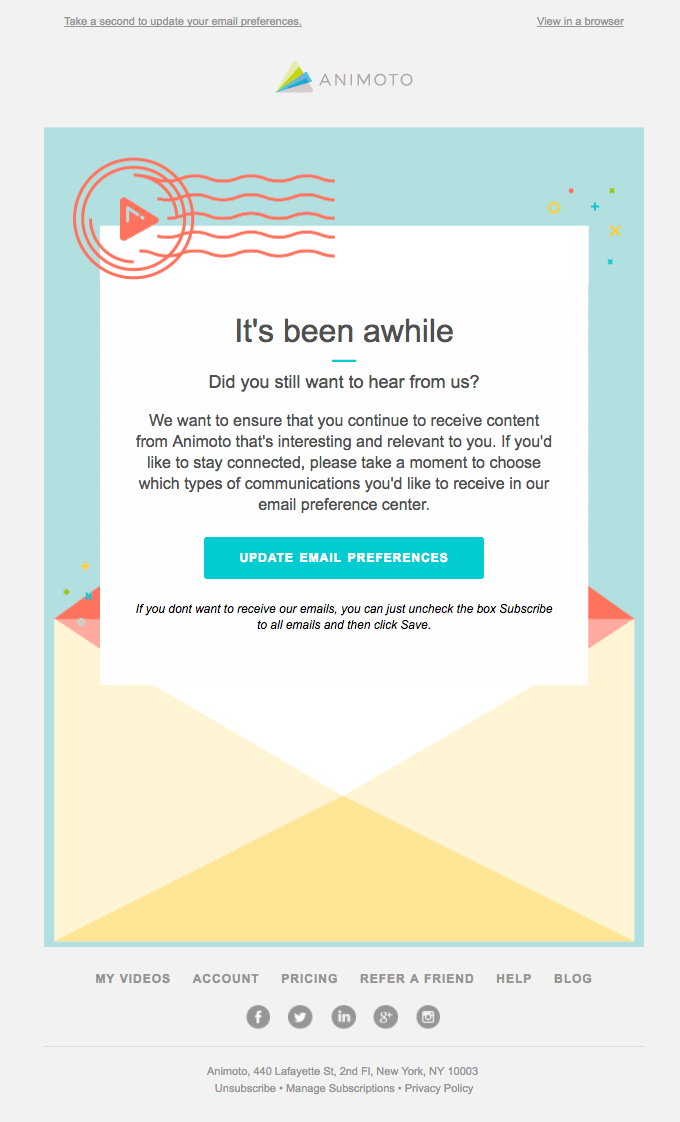
Animoto sends out a simple question: Do you still want to hear from us? Their focus is on allowing subscribers to update their email preferences through a prominent CTA button that directs them to a preference center.

C:\Users\Disha Bhatt\Pictures\Reengage\Animoto-did-you-still-want-to-hear-from-us.png

3. BirchBox

We all love surprises. BirchBox makes use of that emotional instinct in their re-engagement emails. They provide subscribers with two interesting options -- a very rewarding way to re-engage!

C:\Users\Disha Bhatt\Pictures\Reengage\birchbox.png

4. Grammarly

Grammarly re-engages inactive subscribers by presenting them with a “Wrinkle in Time” badge. The prominent CTA button ‘GO’ tempts the users to use their service again. They also promote their premium version at the bottom of the email and hint at a special price as well.

C:\Users\Disha Bhatt\Pictures\Reengage\you-ve-earned-a-new-badge.png

5. Path

Path is a photo-editing app that showcases all their new features to entice inactive subscribers. The ‘Update Now’ CTA stands out and drives engagements by pushing subscribers to update their app.

C:\Users\Disha Bhatt\Pictures\Reengage\what-you-ve-missed-on-path.png

6. ReturnPath

ReturnPath builds a brief background for the re-engagement and allows the subscriber to choose the types of communications they wish to receive. They demonstrate how the preference center works and end the email with two cute illustrations accompanied with related CTA buttons for options for engagement.

C:\Users\Disha Bhatt\Pictures\Reengage\should-we-stay-or-should-we-go.gif

7. SurfStitch

This re-engagement email attempts to feature everything that an inactive subscriber might have missed. They include a provision for the subscriber to adjust email frequency. And they don’t miss out on this opportunity to remind subscribers of their value propositions at the bottom (free express delivery, return policy, and customer service).

C:\Users\Disha Bhatt\Pictures\Reengage\reengagement-email-retail.jpg

8. Urban Outfitters

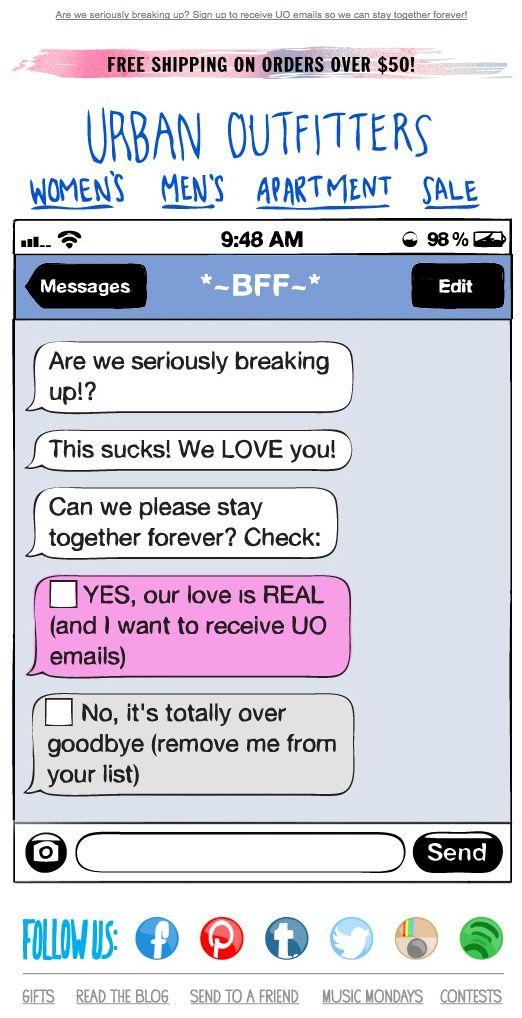
This re-engagement email by Urban Outfitters is a perfect blend of humor and emotional appeal. It’s brand-appropriate, and likely stands out very well from their normal marketing emails.

C:\Users\Disha Bhatt\Pictures\Reengage\re-engagement email- urban outfitters.jpg

9. Paul Mitchell

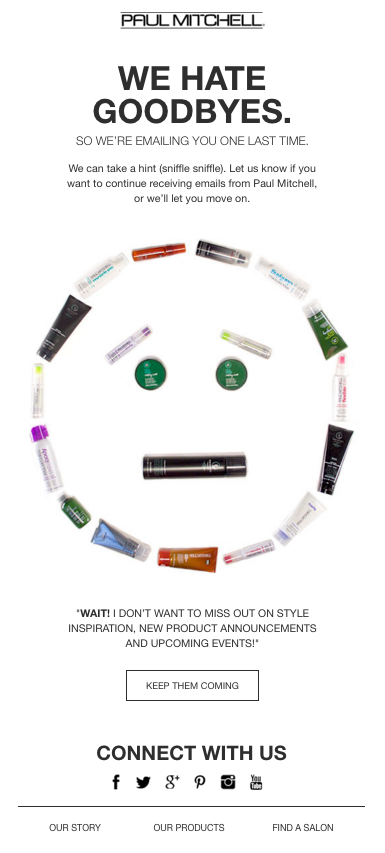
Paul Mitchell starts off their re-engagement email with an emotional ‘We hate goodbyes,’ informing the subscriber that it’s the last email to them. They include their products in a sad or worried face and drive readers prominently to a CTA to stay subscribed.

C:\Users\Disha Bhatt\Pictures\Reengage\re-engage email.png

10. Asthma Foundation

Non-profit organizations can use re-engagement emails effectively as well -- especially when it comes to convincing previous donors to demonstrate their generosity once more. This email by the Asthma Foundation deftly illustrates asthma triggers and quickly goes into persuasion mode to get the subscriber to make another contribution.

C:\Users\Disha Bhatt\Pictures\Reengage\nonprofit-asthma.jpg


Get ready to re-engage.

Subscriber inactivity is a fact of life. How you handle it makes all the difference. Take these subscribers as an opportunity to try new content and innovative approaches to see how you can bring your old customers back and get you new sales.

How to Write a Killer Brand Slogan in 4 Steps [Video]

Use as Directed: A Content Marketing Plan for Robust Business Performance

Posted by Alex-T

The chances that your company invests in a content marketing strategy are very high. Content Marketing Institute revealed that 89% of B2B and 86% of B2C marketers use content marketing, while the money spent on this activity ranges between 26% to 30% of an entire marketing budget.

I believe that spending up to 50% of your overall budget on content marketing needs isn’t too much, if you know how to take advantage of it. Not only will it benefit your brand’s awareness, but it will also help you generate traffic, leads, and sales. My personal experience working with digital businesses has shown that only a few are successful in finding a strategic approach to their content plan. Sadly, most companies practice throwing spaghetti on the wall to see if a piece of content gets any readers.

In this post, you'll learn how to ensure that every piece of content you create drives traffic, attracts leads, and generates sales. I’ll give you ready-to-use solutions on how you can plan, execute, and measure your content promotion, so that content starts earning your business money.

Disclaimer: If you decide to follow any of my recommendations, make sure to adjust these techniques in accordance to your audience’s interests and your business needs, and test, test, and test again. As we all know, every business is unique, and what’s good for one brand may not be as helpful for another. Remember that blindly following any suggestions and mimicking other brands’ activities may not deliver desirable results.

Numbers don’t lie: Measure how your current content is performing

It’s important to start off your new content marketing campaign by analyzing your current situation. You may discover old content that hasn’t performed well yet, but that has the potential to benefit you with a few changes and a second chance. Working with old content is always a good idea, as the copywriting is already taken care of.

Many marketers don’t understand what’s absolutely required when it comes to measuring a content marketing campaign. Data measurement and analysis can be quite intimidating, especially if you're just starting out.

Here are two steps to take in order to get some meaningful insights:

1. Figure out how your content ranks in Google and whether it brings you traffic and conversions

To get ahold of this data, you're going to need a combination of tools.

Start with Google Analytics

The "Landing Pages" report in Google Analytics will show how your pages perform according to the number of impressions, clicks, conversions, and the average position of each page in the search results. To view this report in Google Analytics, your Google Search Console needs to be connected with your Google Analytics account. If you haven’t connected it yet, this data can be viewed directly in Google Search Console via the "Search Traffic" > "Search Analytics" report.

The problem with Google, though, is that it doesn’t give you a page's exact ranking; it only shows your site’s average position. It also requires you to check each page manually, so you can’t see a bigger picture all at once. Using tools — like SEMrush, SpyFu, Searchmetrics, Ahrefs, SERPstat, etc. — will allow you to see more precise data about your content's rankings. For example, here's a screenshot of a Google Analytics report showing a list of keywords for which a specific page appears in the SERPs:

And here’s the same data from SEMrush that allows you to filter pages, export the data, and work with it in a spreadsheet:

2. Find content that can be easily improved/edited to begin bringing value

After completing step #1, you'll have an all-encompassing picture of your content’s past performance. Geared up with the information you’ve uncovered, find those pages that are showing up in the search results and bringing you clicks and conversions, but that aren’t listed among the top five or ten search results. These pages have a lot of potential to make it to the top of Google. I would recommend checking whether these pieces:

  • Are supported by internal links. The higher the referring article is in the search results, the better it is for you.
  • Are easily discoverable. How long will it take a user to find your article? And I’m not talking only about the number of internal links in your content piece, but also whether it's featured in a similar content feed on blog posts.
  • Have enough external links. If there are none, then you should definitely consider mentioning your article in one of your next guest posts, or ask your colleagues in the PR department to help spread the word.
  • Have a well-written title and meta descriptions. Sometimes, this is what really affects your click-through rate and, as a result, your traffic.
  • Make a user stay on your page reading longer. If the answer is no, you need to brainstorm what kind of triggers you can add to your page so that your users spend some time browsing around your content. It could be a catchy GIF, educational videos, or product slide presentations.

The needs and wants of your business: Define the right metrics to track your progress

From an early age, we're taught that there’s a difference between a need and a want, that we only have a few true basic needs, and myriad wants. The same logic can be applied to the business world, but it’s a lot harder to discern and comprehend.

During this stage, you need to select highly meaningful and relevant metrics that align perfectly with your business needs. Please don’t try to use generic metrics — your business may have its own kind of struggles and goals. For some businesses, for instance, a conversion does not equal money. I run a free online conference called Digital Olympus that does not intend to sell anything. For me, a conversion is a registration, and I’ve come to learn that the best conversion for my situation is when a registered user attends my online event. Keep such things in mind at all times!

Another great example of a non-monetary conversion comes from one of my clients. They are a completely free SaaS software for specialists in the agricultural industry. They realized that their conversions aren’t registrations alone, and the reason is quite simple. After carefully analyzing their users’ behavior, they discovered that after a user registers, they aren’t taking advantage of their tool at all. For them, the best conversion is a registered user that is actively involved with their product. Coincidentally, that’s where content marketing can come into play to solve their problems. Their users need help to understand how they can take advantage of the software; adding relevant content to the company’s site will surely add clarity and improve users' understanding of their product.

When it comes to creating and managing content, it’s always a good idea to see exactly how users interact with it. Do they click on your call-to-action buttons? How many of them read your article in its entirety? All of these metrics are very easy to track if you use Google Tag Manager. It’s a must-have tool, allowing you to track whatever you want without going through the excruciating process of dealing with your dev team. Here’s an excellent post by Simo Ahava that explains which metrics you can track and analyze with the help of GTM.

Have your Google Analytics reports ever shown you something like this?:

img_560d3e8dd6eff.png

If the answer is yes, you must know that elevating feeling of joy and excitement, seeing all these visitors checking out your page. But unless you’re a deliberate YouTuber with a fame complex, you’re not interested in traffic, per se. You want to witness conversions.

The goals of pages that attract traffic but don’t convert, in the majority of cases, don't match up to the goals of your web visitors. If you haven’t added lead magnets on those pages yet, it should be your top priority, because currently those content pieces aren’t converting your traffic into something tangible.

Don’t neglect the importance of SEO

Yes, it’s definitely important to write meaningful content that will perfectly resonate with your audience — but that’s not all. If you want to bring a steady flow of new visitors with the help of that content, you must optimize each of your posts to make sure that it has a fighting chance to rank on Google.

I highly recommend spending some time researching topics that will increase your chances to rank well. Below are a few ways you can identify them:

1. Find related keywords

Imagine you discovered that keywords related to "content marketing strategy" are the keywords driving the most conversions. Those keywords should be analyzed in order to find other keywords related to that subject. These keywords have proven to mirror your audience’s search behavior the most, and they're very promising in terms of earning you more paying clients.

One of the easiest ways to find related keywords is to simply check Google’s Autocomplete. You can look for autocomplete suggestions manually or by using tools like AnswerThePublic.com and Keywordtool.io. The latter scans Google Autosuggest and gives you the search volume for each keyword entered. It's a time-saver.

Another tool worth trying is SEMrush's Keyword Magic tool. It automatically gives you the most necessary information about a keyword, factoring in metrics such as CPC and volume (basic, but much-needed), keyword difficulty, competition level, SERP features, and exact and broad keyword matches. This tool gathers the data you need and offers a wide range of analysis for both single keywords and groups of keywords.

2. Check the competition level in the SERPs

After you've compiled a list of related keywords, it’s time to choose the keywords (e.g., topics for your future articles) that will help you rank higher in Google.

To save time, use a tool like SEMrush's Keyword Difficulty. It tells you how difficult it will be for you to promote your piece of content based on the domain’s visibility in organic search results. However, the Keyword Difficulty tool doesn’t consider the number of referring domains for the website or page URL you’re trying to look up. Here’s what you can do to make the process of gathering this missing data hassle-free:

  • Begin by collecting the list of domains and pages (URLs) that currently rank in Google for the list of keywords you’ve selected during the previous step. To speed things up, use a tool that allows you to easily export lists of domains and pages.
  • After you collect all the domains and URLs, you'll need to check the number of referring domains for each of them. Tools like Ahrefs or the Majestic Bulk Backlink Checker will allow you to analyze multiple links at once.
  • Finally, you can get a good understanding of what kinds of keywords have more or less competition based not only on the number of searchers they have, but also on their actual situation in the SERPs.

After these steps are completed, you’ll see how many referring domains each of your content pieces ought to have in order to rank higher. You'll also be able to identify the number of referring domains by looking at how many links have been acquired by the other pages that currently rank well.

Content promotion that gives short-term results

As I’ve mentioned previously, you need to remember that ranking in Google and attracting organic visitors are among the top goals of any content piece. Ideally, every article you publish on your website should eventually rank well, but you need to give your new SEO campaign some time before it bears fruit. While you’re waiting, you can take advantage of the promotional activities that allow for almost instantaneous results. Depending on your budget and your current rankings, choose one of the following promotional activities that seem most relevant for you.

A. Promote your posts on social media channels

Some people say the world will never be same again thanks to social media. Not sure how to interpret that exactly, but not taking advantage of this powerful channel is reckless! This is a basic and very common way to promote content, and it’s not rocket science to figure out how things work. But let me give you a couple of really actionable tips that will help you to maximize the output:

  1. Create a short video to promote your content. They tend to perform really well on Facebook.
  2. Use GIFs that prove to be very effective. Tools like Canva will help you create them without needing to hire a designer, unless you really want your GIFs to win you an award.
  3. On Twitter, tag users that have recently shared something similar to your content. Search for a term that is related to your article, and you’ll see a list of users who you can tag.
  4. Facebook groups are always a great idea — especially private groups. I recommend researching such groups in advance. Be sure to think of a catchy, unique intro you’ll be able to post to each group. This article explains the benefits of building a Facebook group. Get inspired and get out there to network!
  5. If you want to promote your post on Facebook, make sure that your preview image meets the Facebook Ads Guidelines.
  6. Set up a small ad campaign on Twitter targeting users that have recently shared related content. Use BuzzSumo to find like-minded users.

B. Collect leads

If you choose this way of promotion, then you are going to put in some work. A dull page with "meh"-looking content won’t cut it. You'll need to prepare something beforehand, something that will look attractive enough to convince a visitor to give you their email. A user is more likely to give you their contact information when they are offered one (or all) of the following options:

  • Exclusive content
  • Content with quotes from or provided by well-known industry experts
  • A webinar with a popular industry expert
  • Useful tools and templates. For instance, it’d be very helpful if a post offered to download a free and ready-to-use content — a promotional plan with a detailed description of all stages and resources one may need to implement a marketing strategy.

In case you don’t have a staff developer to help you with designing and adding a form to your website, there are different online services (like wisepops.com, wishpond.com, popupmonkey.com, or sumo.com) that you can use to create any kind of forms you want.

C. Use remarketing

Typically, only about 30% of visitors are willing to give you their contact details. The remaining 70% read or skim your content, close the tab, and get back to their routine. But you still have a second chance with them. How? The answer is remarketing:

  1. Prepare banners and landing pages that are relevant to your content. These can invite your users to join a webinar or offer an exclusive content. Basically, you can use the same lead magnets that you’ve already integrated into your content page.
  2. Prepare a script to automatically exclude your existing clients and leads from your remarketing campaign. There’s no need to bother them... yet.

D. Use email marketing automation to turn leads into paying clients

If you are somehow collecting leads and aren’t putting them through email marketing funnels, then you might as well just burn the rest of your money. HubSpot will really come in handy here because you can create email marketing funnels based not only on how users interact with your emails, but also on the type of pages your leads have visited. I’ve tried several HubSpot features while working on a few projects in the past, and I couldn’t have asked for a more powerful functionality.

In case you aren’t a Hubspot user, there are other marketing tools that allow you to create email funnels. I'd also suggest involving your leads in as many activities as you possibly can, because every interaction matters and is making them warmer. Ask them to follow you on social media channels. You can also offer some case studies or success stories another client shared about your brand. Real-life cases with your actual clients are very powerful, and the open and click rates of these emails can be a lot higher.

Before you start pushing your products or services to your leads, it's important to research what brought them to your website in the first place. This is absolutely essential, but sadly, a lot of companies tend to forget to do this research and fail; open rates plummet and users unsubscribe. Don’t let this happen to you.

In conclusion

It’s obvious why some blogs only post a couple of articles a year. What’s the point in creating tons of content that won’t bring any value to the business?

Always keep your SEO goals in mind, and remember that you have to do some preparation in order for them to be delivered accurately and on time. Even short-term results require some leg work. No doubt that, once you’ve adjusted your routine, practiced some of the tactics mentioned above, and are consistent with them, every time you create a piece of meaningful and purposeful content, it will take you less time to manage and promote it.


Sign up for The Moz Top 10, a semimonthly mailer updating you on the top ten hottest pieces of SEO news, tips, and rad links uncovered by the Moz team. Think of it as your exclusive digest of stuff you don't have time to hunt down but want to read!

Tuesday, December 19, 2017

FAQ This! Now That the FCC Voted to Repeal Net Neutrality, What Happens?

Last Thursday, the Federal Communications Commission (FCC) voted 3-to-2 to repeal regulations of internet service providers. Those regulations fell under a general title: net neutrality.

If you have questions -- you're certainly not alone.

How did this happen? What was the case for repealing net neutrality in the first place? And what, exactly, has the FCC voted to dismantle?

Normally, this is the part where I would say, "Relax -- I've got you covered." But for the sake of transparency, I'll be honest. I'm not particularly relaxed -- or happy, for that matter -- about this decision.

And while I will, as always, answer some of the most common questions about the vote as clearly as possible, know this: It's not easy for me to neutrally -- no pun intended -- report on the matter.

Perhaps the answers to these questions will provide some insights as to why.

1. What is net neutrality?

Net Neutrality is a collection of regulations that prevent internet service providers (ISPs) -- like Xfinity, Spectrum, or Verizon, for example -- from altering internet speeds or censoring online content. In other words, it allows free speech on the internet, without corporations deciding which sites or applications are allowed or blocked.

Net neutrality originally took effect in 2015, when the FCC approved net neutrality after years of debate, which included two rejections of earlier versions of rules and regulations. The tipping point came when Title II of the Communications Act -- I'll explain that in more detail in a bit -- which essentially laid the legal groundwork to bar ISPs from obstructing online information and access.

The post-net-neutrality web came to be known as the "open internet": a web where, as Free Press phrased it, users could "share and access information of their choosing without interference."

2. What is Title II?

Here's where the legal aspect of net neutrality really comes into play -- but please note that this blog post is not legal advice and instead provides background information to help you better understand the background of and the vote to repeal net neutrality.

When we talk about the repeal of net neutrality, we're really talking about a reversal of Title II of the Communications Act. In 1934, the Act was first passed to regulate mass media communication -- at that time, it was things like "wire and radio".

The Title II section of the Act was written to regulate “common carriers” like utility providers of electricity and telephone landlines. And when efforts were made to enforce net neutrality, the turning point came when ISPs were reclassified as "common carriers" regulated under Title II. It's quite lengthy and can be read in full here, but using that reclassification as a foundation, the Open Internet Order went into effect, making the below, pivotal declaration (among many others):

" ... carefully-tailored rules to protect Internet openness will allow investment and innovation to continue to flourish. ... today we adopt carefully-tailored rules that would prevent specific practices we know are harmful to Internet openness— blocking, throttling, and paid prioritization—as well as a strong standard of conduct designed to prevent the deployment of new practices that would harm Internet openness. We also enhance our transparency rule to ensure that consumers are fully informed as to whether the services they purchase are delivering what they expect."

But last Thursday, the FCC voted to repeal this regulation and oversight, which will reverse things like:

  • The inability of ISPs to block or charge extra for select online content.
  • The delivery of high-speed internet as a utility -- like the aforementioned electricity and telephone landlines.

3. What are the arguments for net neutrality?

Fair Competition

They say that competition is good for the consumer -- it provides the public with various pricing and provider options from companies both large and small.

As you may have noticed, in most U.S. regions, there isn't much competition -- if any -- for ISPs or cable providers. Here in Boston, the market is largely monopolized by Xfinity, and in others, it might be Spectrum or Verizon. There's very little room -- again, if any -- for smaller players, and without net neutrality, that same issue will extend to streaming content providers.

Take the Washington Post's example of Hulu and Netflix (the latter of which expressly dissented the repeal). While those two (large) companies will still be able to compete fairly, mostly due to their respective abilities to pay the post-repeal fees required for faster content delivery fees -- smaller players will have too high a barrier to enter the market.

Free Speech

This point might be the one that you've heard about the most. As we noted above, the Open Internet Order barred ISPs from censoring certain content, websites, or applications as they see fit. Now, those regulations will no longer be enforced.

And while such ISPs as Comcast promised to maintain net neutrality ...

... since last Thursday's vote, certain key pieces of its previous written commitment have been deleted from its website.

4. What are the arguments against net neutrality?

Regulation = "Micro-Managing" = Restricted Innovation

Those in favor of repealing net neutrality, like FCC Chairman Ajit Pai, argued that such regulations were accomplishing little more than "micromanaging the internet." And by classifying ISPs as utilities, net neutrality opponents say, it stifles their abilities to innovate.

By removing regulations, opponents argue, ISPs will be free to "catalyze innovation," according to statements from Verizon. And while supporters of net neutrality argue that its reversal will actually minimize competition, its opponents say that it will help boost it -- by way of the freedom to build better networks and charge accordingly for access to them.

“We are helping consumers and promoting competition,” Chairman Pai stated prior to the vote. “Broadband providers will have more incentive to build networks, especially to underserved areas.”

However, this innovation may simply come in the form of the ISPs' freedom to charge more for higher speeds, which potentially holds serious repercussions for businesses that rely on such in order to operate -- and further increases barriers to entry for smaller and emerging companies. That could actually minimize competition, as opposed to the Chairman's arguments, and the higher cost could be passed onto the consumer.

There Was Nothing Wrong With the Internet Prior to Net Neutrality

This one is fairly intuitive. Net neutrality opponents have argued that since the internet worked just fine prior to the 2015 regulations, it will continue to operate normally and satisfactorily without it now.

In a blog post published the day prior to the FCC vote, Comcast Senior Executive Vice President David Cohen wrote that "there is a lot of misinformation that this is the 'end of the world as we know it' for the Internet."

In other words, supporters of net neutrality are overreacting to its repeal -- and should stop treating it as something, in the words of Commissioner Brendan Carr, "apocalyptic."

5. Is net neutrality dead for good?

Not yet, exactly -- here's what happens next.

First, it was discovered that public comments in support of the repeal were fabricated, with plagiarizers leaving pro-reversal comments under the names of people who are no longer alive.

New York State Attorney General Eric Schneiderman has compiled a database that allows users to find out if names of their relatives or loved ones were used in this manner -- as was the case for designer Morgan Knutson. And while these findings alone most likely can't invalidate the FCC's vote, they could support congressional efforts to maintain net neutrality.

And about those efforts: Over a dozen senators, including Brian Schatz of Hawaii and Ed Markey of Massachusetts, are working to present a Congressional Review Act -- the process that allows Congress to counter regulatory rulings from federal agencies -- that would nullify the FCC's vote. It's worth noting, too, that if such an Act did reverse the vote, the FCC would not be able to act to repeal net neutrality again.

In sum, the FCC's vote has carved a very clear, accessible path for the aforementioned changes to become a reality -- but they haven't gone into effect yet.

And as for what the vote means for small-to-midsize businesses, as we mentioned before, there may be repercussions as a result of the potential for more steeply-priced access to the high-speed internet that so many of us rely on. But until these changes actually take effect and regulations are officially dismantled -- pending the Congressional Review Act -- it's too soon to tell.

As always, I'm open to your take on the matter. Feel free to reach out to me with your thoughts and questions on Twitter.

Featured image credit: “We Love Net Neutrality action at Verizon with Light Panels - Photos by Alex Garland” by Backbone Campaign is licensed under CC BY 2.0 / Cropped from original